Home / Case Studies / Simam 3D Studio

Creation ToolsBack to Portfolio

Simam 3D Studio

Client/Sector: Simam Digital / spatial-authoring product

A browser-based 3D authoring workspace for scenes, transforms, annotations and spatial content.

Project Snapshot

  • FocusSpatial authoring, scene management and creator workflow
  • PlatformWeb 3D editor, asset tools and interactive viewport
  • OutcomeA substantial working tool demonstrating advanced browser engineering.
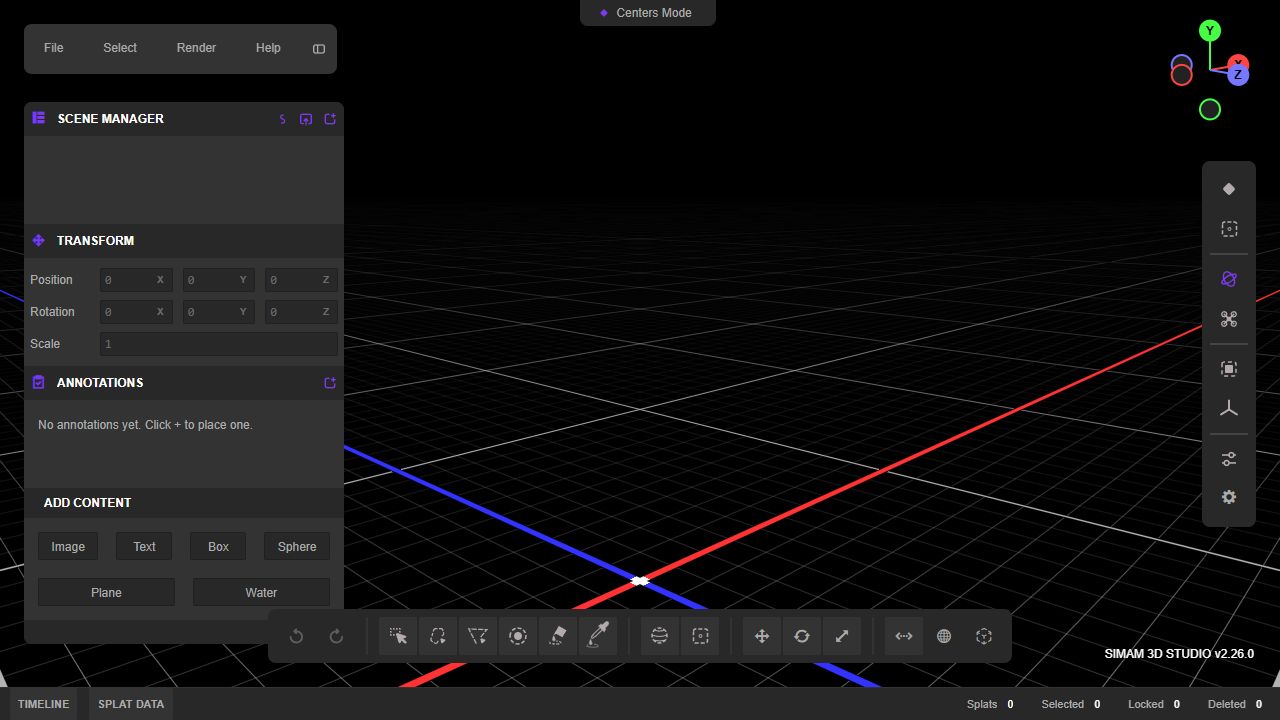
Simam 3D Studio live product screenshot

01 Challenge

The product problem

Creating interactive 3D scenes usually requires heavyweight desktop software and specialised workflows. The product explores how core authoring tasks can move into an accessible browser workspace without reducing the interface to a toy demo.

02 Approach

Turning complexity into a usable product

I organised the tool around familiar creator concepts: scene hierarchy, transforms, primitives, annotations, rendering controls and a timeline. The interface favours compact professional controls because the intended user is actively building, not browsing marketing content.

03 Execution

What I designed and built

The working editor supports position, rotation and scale controls alongside image, text, geometry, water and splat-oriented workflows. Versioned UI and dense inspector panels communicate that this is an evolving product surface rather than a static mock-up.

04 Outcome

What the POC proves

Simam 3D Studio is one of the strongest demonstrations of frontend depth in the collection. It shows complex application-state design, spatial interaction and the ability to translate desktop-authoring conventions into a web product.
Technical delivery

How the product was shaped

Simam 3D Studio is an authoring product, which means the difficult work sits in state, selection and persistence—not only rendering a model in the browser.

The scene graph is the product model

Objects, parents, transforms, visibility and metadata were represented separately from the viewport so hierarchy and selection could remain consistent. That makes common editor operations—duplicate, rename, reparent, hide or inspect—predictable and creates a route to undo, permissions and collaborative persistence.

Direct manipulation with precise fallback

Transform gizmos support fast spatial editing, while numeric controls give users a precise and accessible alternative. Selection, hover and camera input needed clear ownership so dragging an object did not accidentally orbit the scene. The UI exposes technical state without requiring the user to think like a game-engine developer.

Projects that can be saved, not just viewed

Annotations, scene settings and object metadata were designed as serialisable project state rather than temporary DOM or render values. That distinction turns a viewer into a foundation for real authoring workflows, including saved revisions, branded outputs and domain-specific tools layered on the same editor core.

Project summary

Simam 3D Studio quick facts

What was built
A browser-based 3D authoring workspace for scenes, transforms, annotations and spatial content.
Role
Product direction, 3D editor architecture, interaction design and browser-based implementation through Simam Digital.
Outcome
A working browser authoring POC that demonstrates reusable foundations for client-specific spatial editors and review tools.
Stack
Browser 3D rendering, scene graph, transform controls, selection state, annotations, asset loading and serialisable project data.

Frequently asked questions

Is this a disclosed client deployment?

No. It is presented as a self-hosted Simam Digital product or NDA-safe proof of concept without identifying confidential clients.